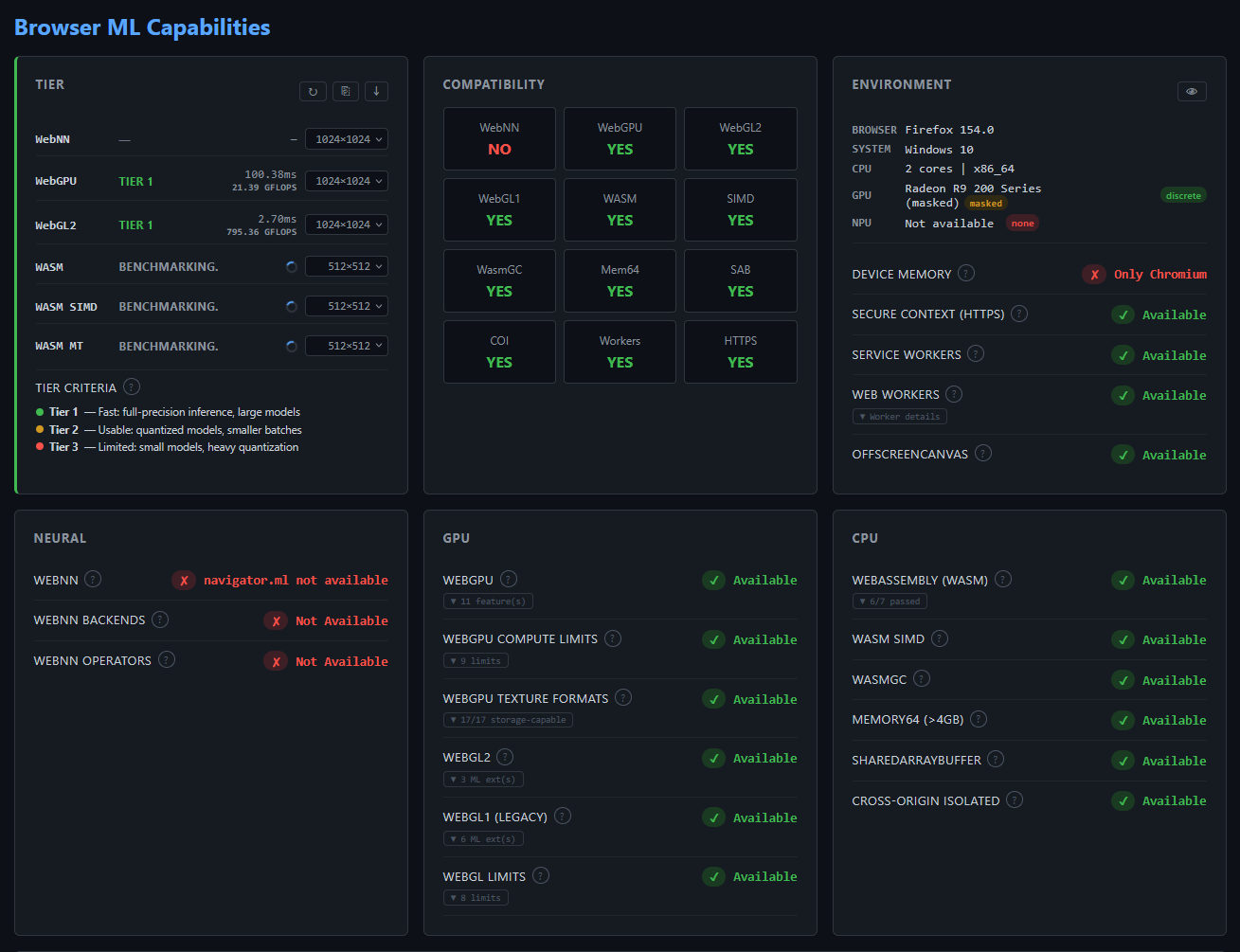
ml-browser-check/
A browser capability checker that detects ML-related APIs and hardware acceleration support. Includes a performance benchmark that classifies the device into a tier based on throughput (GFLOPS/TFLOPS). This tool is essential for understanding what backends are available before running benchmarks.
Purpose
Before benchmarking ML frameworks, we need to know what the browser supports and how fast it is. ml-browser-check/ detects:
- GPU: WebGPU (features, compute limits, texture formats), WebGL2 (ML extensions, hardware limits), WebGL1 (legacy)
- Compute: WebAssembly (SIMD, WasmGC, Memory64), SharedArrayBuffer, Cross-Origin Isolation
- Neural: WebNN, backend types (GPU/CPU/NPU), operator support matrix
- Environment: Secure context, device memory, Workers, OffscreenCanvas, Service Workers
- Performance: 1024×1024 f32 matrix multiply benchmark per backend, device tier classification by GFLOPS/TFLOPS throughput
This information informs the compatibility matrix and helps explain why certain backends may not be available on specific browser/hardware combinations.
What it detects
| Category | Features |
|---|---|
| Tier | Per-backend benchmark (selectable matrix sizes 128–2048), tier classification by throughput (GFLOPS/TFLOPS) |
| GPU | WebGPU (adapter info, features, compute limits, texture formats), WebGL2 (ML extensions, hardware limits, EXT_disjoint_timer_query_webgl2), WebGL1 (legacy) |
| Compute | WebAssembly (in Web Worker), WASM SIMD, 6 WASM proposals, WasmGC, Memory64, SharedArrayBuffer, Cross-Origin Isolated |
| Neural | WebNN, WebNN backends (GPU/CPU/NPU), WebNN operators (25 ops) |
| Environment | Secure context, device memory (navigator.deviceMemory + performance.memory), Web Workers, Shared Workers, OffscreenCanvas, Service Workers |
| Compatibility | YES/NO grid with details (feature counts, core counts, memory) |
Tier Classification
The tier card benchmarks each backend independently with configurable matrix sizes (default: GPU/WebNN 1024×1024, WASM 512×512). Users can change sizes via dropdown to rerun benchmarks.
Tiers are based on throughput (GFLOPS/TFLOPS), not raw time, making them fair across different matrix sizes:
| Tier | Throughput | Color | Meaning |
|---|---|---|---|
| Tier 1 | ≥ 10 GFLOPS | Green | Fast — full-precision inference, large models |
| Tier 2 | 1–10 GFLOPS | Yellow | Usable — quantized models, smaller batches |
| Tier 3 | < 1 GFLOPS | Red | Limited — small models, heavy quantization |
Throughput formula: GFLOPS = 2 × N³ ÷ time (f32 matmul FLOPS = 2 × N³)
Each backend is benchmarked independently:
- WebGPU — compute shader matmul via
device.queue.writeBuffer+ compute pipeline (main thread, async) - WebGL2 — fragment shader matmul via render-to-texture (main thread, async, timed via
EXT_disjoint_timer_query_webgl2where available) - WASM — CPU scalar matmul via Web Worker (non-blocking,
performance.now()) - WebNN — matmul via
MLGraphBuilder.matmul+context.dispatch(main thread, async)
GPU backends (WebGPU/WebGL2/WebNN) launch in parallel. WASM runs in a dedicated Web Worker to avoid blocking the main thread. Each row renders progressively as its benchmark completes, with a spinner and "Benchmarking..." animation during execution.
Why it exists
Browser ML frameworks depend on specific APIs that may or may not be available:
- WebGPU requires Chrome 113+, HTTPS, and hardware GPU
- WASM SIMD requires Cross-Origin Isolation (COOP/COEP headers)
- SharedArrayBuffer requires COOP/COEP headers
- WebNN is experimental and requires
navigator.ml
Beyond API availability, hardware limits determine what actually works:
- Max texture size caps input resolution for image models
- WebGPU compute limits cap batch size and weight tensor dimensions
- WebNN operator support determines which model architectures run without fallback
- Device memory limits WASM allocation budgets
- Texture format storage support determines which formats work for compute pipelines
Without checking these capabilities first, benchmarks may silently fall back to slower backends, fail on large models, or crash on unsupported operators.
How to Run
Bun (recommended)
Node.js
Docker
Then open http://localhost:3456 in your browser.
Important: COOP-COEP Headers
Server Required
The server must run with COOP/COEP headers to enable SharedArrayBuffer and WASM SIMD.
The server automatically sets these headers:
Opening index.html via file:// protocol will NOT work — cross-origin isolation requires HTTP headers.
Layout (3-column)
┌─────────────┬─────────────┬─────────────┐
│ Tier        │ Compat      │ Environment │
│ (benchmark) │ (YES/NO)    │ (HTTPS,mem) │
├─────────────┼─────────────┼─────────────┤
│ Neural      │ GPU         │ CPU         │
│ (WebNN,     │ (WebGPU,    │ (WASM,      │
│  backends)  │  WebGL)     │  SAB, COI)  │
├─────────────┴─────────────┴─────────────┤
│ Info (browser notes, internal URLs)     │
└─────────────────────────────────────────┘
Output Sections
Tier (top-left)
Per-backend benchmark table with interactive dimension selectors. Each row renders progressively as its benchmark completes:
- WebNN — matmul via
MLGraphBuilder.matmul+context.dispatch(main thread, async) - WebGPU — compute shader matmul via
device.queue.writeBuffer+ compute pipeline (main thread, async) - WebGL2 — fragment shader matmul via render-to-texture (main thread, async,
EXT_disjoint_timer_query_webgl2for GPU-only timing) - WASM — CPU scalar matmul via Web Worker (non-blocking,
performance.now())
Each row shows: backend name, tier badge (color-coded), raw time, throughput (GFLOPS/TFLOPS), and a dimension selector dropdown (128–2048). Selecting a new size reruns that backend's benchmark immediately. WASM defaults to 512×512; others default to 1024×1024.
Tier criteria and timing methodology are in a tooltip at the bottom of the card.
Compatibility (top-center)
Grid showing YES/NO with details: - WebGPU (feature count), WebGL2 (extension count), WebGL1 - WebNN, WASM, SIMD, WasmGC, Mem64, SAB, COI - Workers (core count), Offscreen, HTTPS, Device Memory (GB)
Environment (top-right)
- Secure Context (HTTPS)
- Device Memory (
navigator.deviceMemory+performance.memoryheap info) - Web Workers, Shared Workers, OffscreenCanvas, Service Workers
Neural (middle-left)
- WebNN — API presence, backends (GPU/CPU/NPU), 25 operators
GPU (middle-center)
- WebGPU — adapter info, feature flags, compute limits, texture formats
- WebGL2 / WebGL1 — ML extensions, hardware limits
CPU (middle-right)
- WASM — base support, 6 proposals, SIMD, WasmGC, Memory64
- SharedArrayBuffer, Cross-Origin Isolated
Info (bottom, full width)
Browser notes, internal URLs for debugging (chrome://flags, about:config)
File structure
ml-browser-check/
├── index.html          Browser capability checker UI
├── bench-wasm.js       Web Worker for non-blocking WASM benchmark
├── server.js           Bun server with COOP/COEP headers + static files
├── node_server.mjs     Node.js equivalent server
├── Dockerfile          Docker configuration
└── README.md           Documentation
Connection to thesis
The capability detection results from ml-browser-check/ directly inform:
- Chapter 3 (Methodology): Experimental environment documentation
- Chapter 3a (Implementation): Backend and capability detection section
- Appendix: Browser compatibility tables